Conventions: codes, colours and dates
SBDMS uses the same small set of codes, colours and words on every screen. Learn them once here and the rest of the guide reads faster. This page is for everyone.
UPC codes
Section titled “UPC codes”A UPC (Unique Participant Code) is the identity of one person in SBDMS. Children and guardians each get their own.
- Format: four capital letters, a dash, four digits. Example:
QUQV-7135. - It is printed on the QR card at registration and shown on the profile page. Scanning the QR card and typing the code do the same thing.
- Codes are never reused. A child keeps the same code for life, at every camp site.
- When you type a code, include the dash and use capital letters. On the Prashan page the exact code also finds a child registered at another site; a partial code or a name does not.
Staff members have a similar code (letters from their name plus four digits, for example RAME-4821) used in the QR scanning flow. Anything shown in the narrow monospaced typeface with dashes is a code. Copy it exactly.
Dates and times
Section titled “Dates and times”Nepal uses two calendars, and so does SBDMS.
- AD (Anno Domini, the international calendar) is what the system stores.
- BS (Bikram Sambat, the Nepali calendar, about 57 years ahead) is what the Anusuchi forms require.
Every date in the app shows both, AD first: 2026-04-23, 2083-01-10. A date with a time reads 2026-04-23, 7:00AM, 2083-01-10.
Forms that ask for a date usually let you type either calendar; the other one fills in for you. An impossible BS date (for example day 90) is rejected.
All times are Nepal time (GMT+5:45). Reports say so in their header. A dose date can never be in the future; the page and the server both refuse it, because you cannot have given a dose tomorrow.
Status words
Section titled “Status words”A child’s record carries one status word. You see it as a small pill on the participants list, the profile and the Prashan page.
| Status | Pill colour | Meaning |
|---|---|---|
| Self Registered | Grey | Registered by a parent on the public form, or imported, and not yet checked by staff. Shows Prefers: [site] under the pill, the camp the family said they would attend. Must be verified before the child can be dosed. |
| Verified | Green | A staff member checked the details against the parent. Shows the site where this happened. |
| Org Verified | Grey | Loaded from a school’s or children’s home’s roster by an admin. Counts as verified; the child can be dosed from the Org Prashan page. |
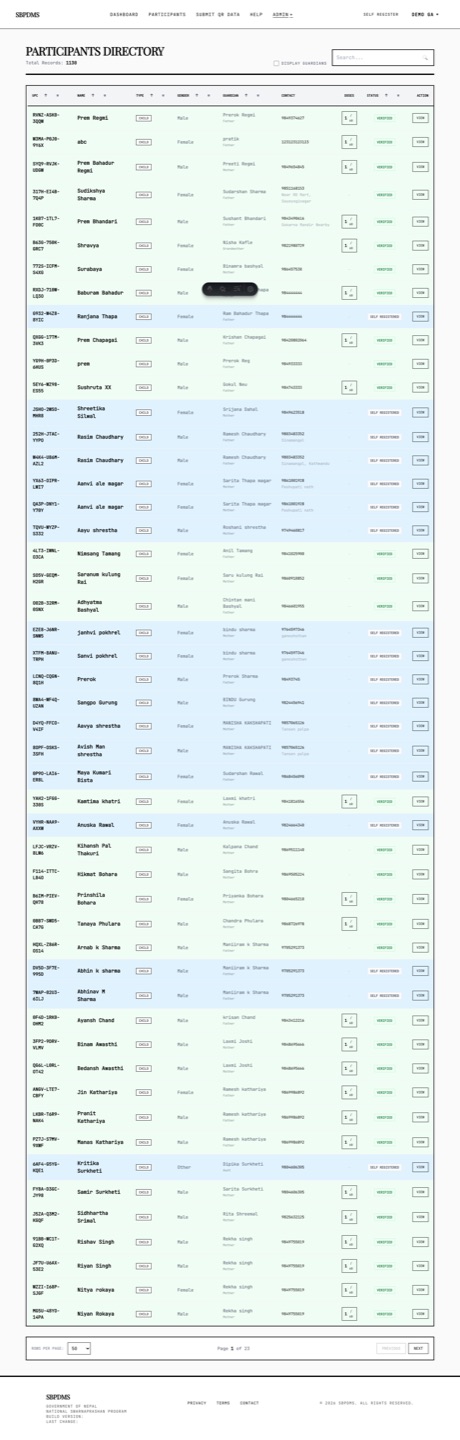 The participants list. Each row carries a status pill; verified children are green.
Other status words you will meet:
- Camp days: Scheduled, Ongoing, Completed, Cancelled.
- Dose preparations: Draft (still editable) and Locked (final, can be attached to a camp day).
- A dose session: Completed (dose given) or FilteredOut (screened, excluded, no dose).
Colours
Section titled “Colours”The base look is black ink on white (or olive-green ink, the default theme; see the footer toggle on Finding your way around). Colour is used sparingly and always means something.
| Colour | Where | Meaning |
|---|---|---|
| Green | Success toasts, Verified pills, dose tiles on the timeline | Done, confirmed, a real dose recorded |
| Light green | Timeline tiles | A prior dose the guardian reported from a paper register |
| Red | Error toasts, validation borders, Delete buttons, missed-month tiles, the underweight flag, Not prepared yet | Something failed, is missing, or is destructive |
| Orange | Timeline tiles | The child came but was excluded that month |
| Yellow | Timeline tiles; the UPCOMING SESSION card | Months before six months of age or outside the programme; an upcoming day |
| Amber | Banners and warning modals | Attention: a child from another site, screened-but-not-dosed count, the lifetime-dose panel |
| Blue | Camp Days in the Admin dropdown; a small dot on a tile | The most-used page; this month has a remark |
| Grey | Future tiles, disabled buttons, Self Registered pills | Not yet, or not available |
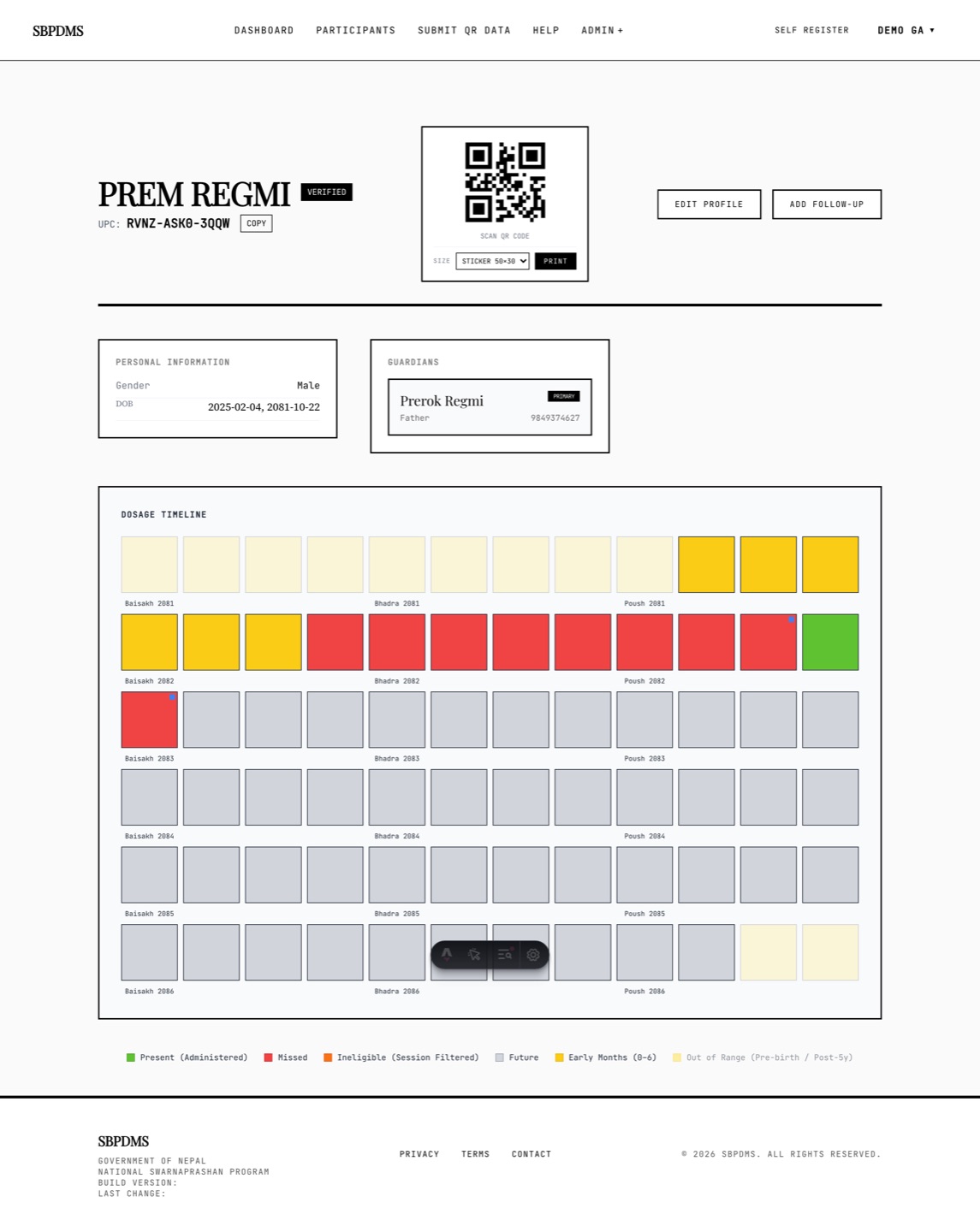 The month-by-month timeline on a child’s profile. Each tile’s colour tells you what happened that month.
On the participants list the search term is highlighted in yellow inside matching names and codes. Rows do not change colour by status; the pill does.
Toasts
Section titled “Toasts”A toast is a small message that slides in at the top right (top of the screen on a phone).
- Green with a tick — success, for example Saved. It fades out on its own after a few seconds.
- Red with an exclamation mark — an error. It stays until you click it or its ×, so you cannot miss a failed save.
- White with an i — information. Fades on its own.
Several toasts stack, newest at the top. Click a toast anywhere to dismiss it.
Confirm dialogs
Section titled “Confirm dialogs”Before anything that cannot be undone, a dialog with a black frame asks you to confirm. It has a title, a one-line question, a Cancel button and an action button. If the action is destructive (delete, unlink, mark completed) the action button is red.
To back out: click Cancel, press Esc, or click the dark area around the dialog. Only the action button goes ahead.
Loading states
Section titled “Loading states”- While any request is in flight, a full-screen white overlay with a spinner and the word Working… blocks clicks. This stops you double-submitting a form.
- Lists show grey striped skeleton bars with a moving shimmer where rows will appear. If a skeleton stays for more than about ten seconds, the connection to the server has stalled; reload the page.
The English / Nepali toggle
Section titled “The English / Nepali toggle”The public Self Register page shows every label in both English and नेपाली. Two checkboxes, English and Nepali, sit in the header of that page (in the menu on a phone). Untick one to show only the other. You cannot untick both; the last one stays on.
The toggle only affects labels. Names and addresses stay in whatever script they were typed in. Staff pages (dashboard, participants, admin) are in English, with Nepali used where the government forms require it (for example Anusuchi headings).
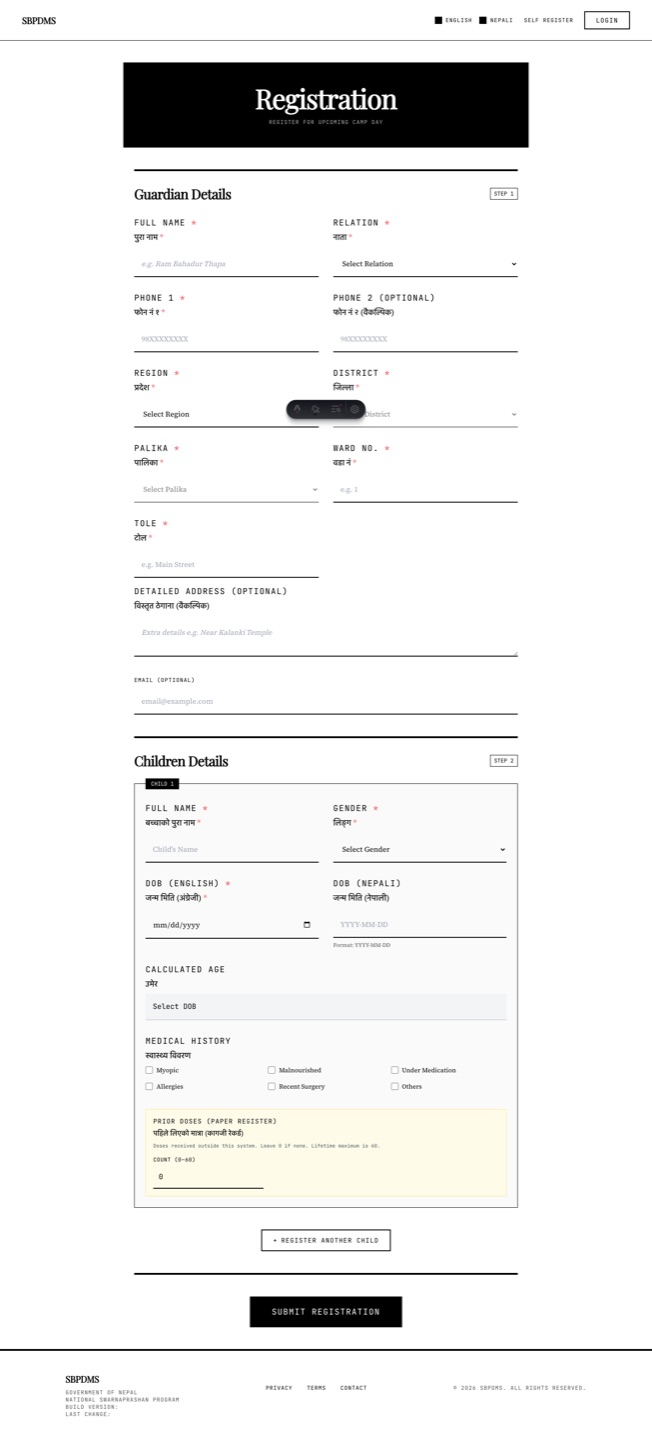 The Self Register form. Every label appears in English and नेपाली until you switch one off.
Glossary
Section titled “Glossary”| Term | Meaning |
|---|---|
| Prashan | Giving the Swarnaprashana drops. A Prashan day is a day when drops are given at a camp site, on Pushya Nakshatra. |
| Swarna Bindu | “Golden drop”: the gold-based preparation the programme gives. |
| Camp site | A hospital or health centre where Prashan days happen. Every staff account, camp day and dose batch belongs to a camp site. |
| Camp day | One scheduled Prashan day at one camp site, with a start and end time, attached dose batches and assigned staff. |
| Dose session | One child’s visit on one camp day: screening, then either a dose or an exclusion. |
| Screening | Recording the child’s vitals (height, weight, arm and head circumference, temperature) and checking exclusion criteria before the dose. |
| Exclusion criterion | A reason a child must not get the drops today (for example fever). Ticking one marks the session FilteredOut and asks for a remark. |
| Dose preparation (dose batch) | One batch of the drops made for one camp site: its ingredients, quantities, who prepared it and when. Has a batch code. Locked once made. |
| Dose rules | The number of drops by age band, set by the clinical lead in Admin → Dose Rules. |
| UPC | Unique Participant Code, XXXX-0000. See above. |
| Preferred site / home site | The camp site a family chose at registration, or where the child was verified. Dosing elsewhere is allowed but flagged. |
| Office Staff | Any staff account in SBDMS. The older name HPV (Health Promotion Volunteer) still appears in a few web addresses; it means the same thing. |
| Anusuchi | अनुसूची, “schedule” or “annex”: the official government forms. Anusuchi-2 is the register of children and their doses; Anusuchi-3 is the monthly summary by sex and new/repeat. |
| Audit log | The record of who changed what and when. SuperAdmin and GeneralAdmin only. |
| Lifetime cap | A child may receive at most 60 doses in total. The Prashan page and the server both stop a 61st. |